


WithSecure™ Elements Exposure Management (XM).
AI-powered exposure management, built for midsize organisations.

Your patch cycle is running out of time.
A new exploited vulnerability is published every two days — and CVE-to-exploit timelines are collapsing toward 24 hours. If you’re still patching and remediating vulnerabilities and misconfigurations on a monthly cycle, WithSecure™ Elements Exposure Management closes the gap before it gets used against you. Discover, prioritize, and act on your exposures.
 Minimum fixes, maximum impact.
 360° visibility. One platform.
 Supports your compliance
 Built for the speed of AI‑accelerated attacks
 Luminen™ AI — assistant included
 Reports your board will actually read
What does Elements XM cover?
Elements XM gives you continuous visibility across your full attack surface — from devices, identities, and external exposure through to cloud infrastructure. Everything feeds one AI-powered engine that simulates attack paths, calculates the minimum fixes needed to break the most dangerous routes, and gives your team a clear, prioritized action list. Choose a tab to explore what Elements XM covers.
One view of your entire attack surface.
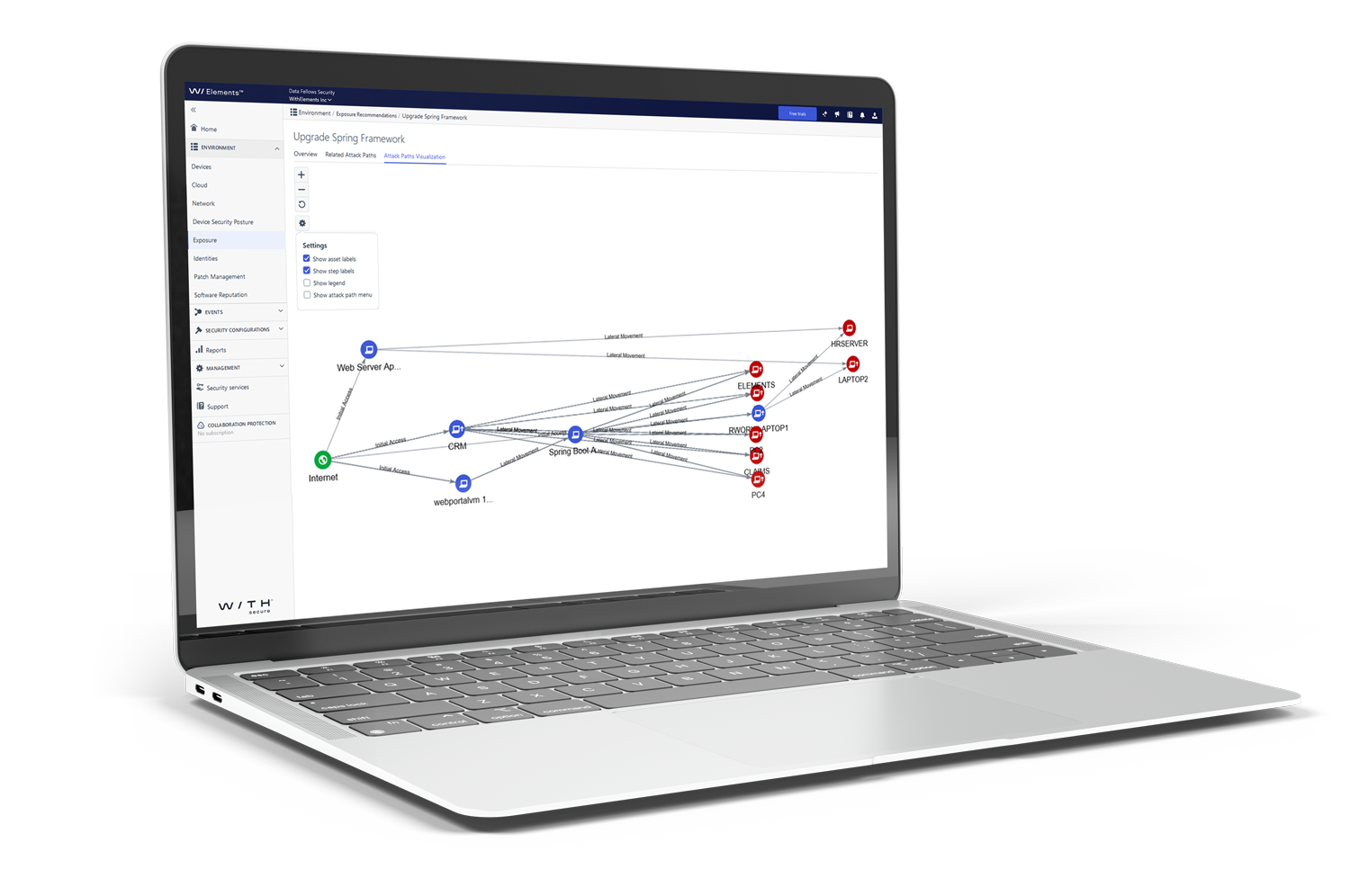
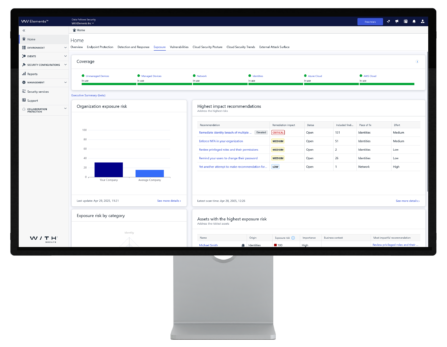
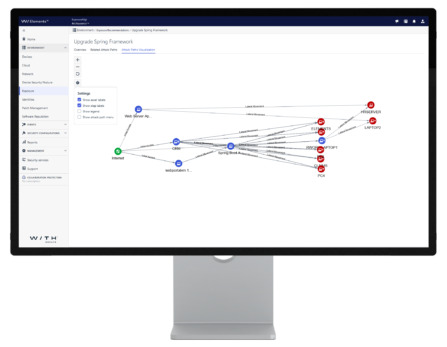
Brings together findings from all environments — devices, network, identities, cloud, and external attack surface — into a single risk-based dashboard. Exposure scores tell you where your biggest risks are. Attack path visualisation shows step-by-step how an attacker could move through your environment and exactly which fix breaks the chain.
Prove value upward. Connect to the tools you already use.
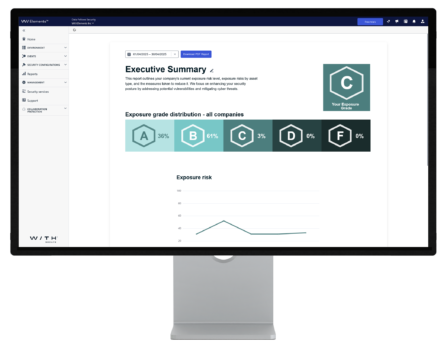
Schedule automated PDF reports showing exposure status, trends, and the impact of remediation actions — in a format built for leadership, not technical teams. The Recommendations API pushes findings directly into your SIEM, ticketing, or ITSM platform so your team works from familiar tools, not a separate portal.
Faster remediation for your whole team.
Luminen aggregates related findings, assets, and remediation steps into one synergistic summary — so your team spends less time interpreting alerts and more time closing exposures. It validates and contextualises recommendations, helping your security administrators understand not just what to fix, but why it matters and what impact fixing it will have on your overall exposure score.
Are all your devices and network assets visible?
Scans Windows workstations and servers automatically via the Elements Agent, and maps every IP-connected network asset — including unmanaged devices and equipment like firewalls and switches — via scan nodes. Authenticated scanning for local nodes logs directly into systems to retrieve full vulnerability details. Remote devices outside the office network are covered without any extra configuration.
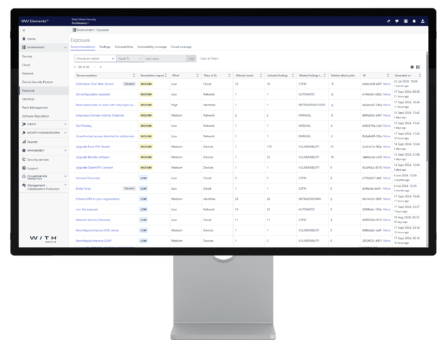
What can an attacker see from the outside?
Continuously crawls and maps all internet-facing systems, web applications, and public IPs to give you an attacker’s-eye view of your exposed perimeter. Detects domain takeover risks, scans externally accessible systems for vulnerabilities, tests custom web applications, and automatically adds new internet detections as the threat landscape evolves.
Which identities are your riskiest choke points?
Integrates with Microsoft Entra ID to discover all user and non-human identities, map access rights, and flag overprivileged accounts. Continuously monitors for breached credentials and models how a compromised identity could move laterally into devices and cloud resources — showing exactly which fix breaks that path before an attacker walks it.
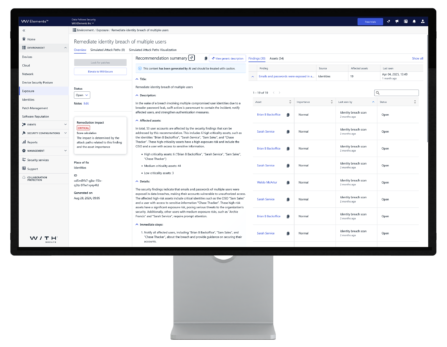
Which fixes will make the biggest difference?
Is your Azure environment configured securely?
Assesses Azure resources against close to 100 configuration checks — informed by WithSecure’s cloud security research, current attack techniques, and Azure best practices. Findings feed directly into the attack path engine, so cloud misconfigurations are prioritized in the same view as your device and identity risks.
Are your public-facing systems holding up?
Scans your AWS cloud resources for misconfigurations — the same rigorous analysis applied to your internal environment, now applied to the perimeter an attacker would probe first.
Could an attacker move from your cloud into your offices?
Simulates lateral movement from cloud environments to on-premises devices — modelling cryptojacking, data theft, and ransomware scenarios based on current exploitation trends identified by WithSecure’s threat research. Combines Azure events, Entra ID identity data, and device telemetry so hybrid attack paths are visible and actionable from one place.
Independently recognized






Exposure management resources worth your time.
From our own threat research on CVE-to-exploit timelines to practical NIS2 compliance guidance — written by our experts.

Blog
Building proactive cybersecurity – a 7-step MSP guide
Blog
Building proactive cybersecurity – a 7-step MSP guide

Blog
The MSP’s guide to buying proactive cybersecurity – European style

Blog
Why midmarket MSPs need proactive cybersecurity … now
Explore the solution via brochures.
Find out more information about Elements XM capabilities from our brochures
A concise summary of WithSecure™ Elements Exposure Management — covering key capabilities and benefits, designed for quick sharing with stakeholders and decision-makers.

A detailed commercial & technical overview of WithSecure™ Elements Exposure Management — covering how it works, what it scans, and the technology behind it, for buyers evaluating the solution in depth.
See your attack surface for 30 days, risk-free.
Start a no-commitment 30-day trial of WithSecure Elements Exposure Management — no credit card, no implementation project. You’ll see your first attack path visualisation within hours of onboarding, with AI-powered remediation recommendations and Luminen AI guidance from day one. Most organisations discover exposures they didn’t know existed within the first week.

Common questions, answered directly.
From what exposure management means for a mid-sized organisation, to how Elements XM differs from the vulnerability scanner you’re already running — answered without the jargon.
Vulnerability management focuses on finding and patching software vulnerabilities, typically using a scanner and a CVSS score to rank findings. Exposure management goes further in three ways. First, it covers a broader attack surface — including identity risks, cloud misconfigurations, and external-facing assets that traditional vulnerability scanners don’t always reach. Second, it uses attack path simulation to prioritize by actual exploitability and business impact, not just vulnerability severity. Third, it operates continuously — adjusting priorities as your environment changes and as new threat intelligence arrives — rather than producing a point-in-time snapshot that ages within days.
Elements XM provides 360° visibility across five areas: managed devices (Windows workstations and servers via Elements Agent), network assets (network equipment and unmanaged devices via scan nodes), external attack surface (internet-facing systems, web applications, and public IPs), digital identities (Microsoft Entra ID users and non-human identities), and cloud infrastructure (Azure and AWS). All findings are enriched with real-time threat intelligence and business context, then fed into the patent-pending attack path simulation engine to produce a prioritized, actionable remediation list.
Attack path simulation models the routes an attacker could take through your environment to reach a business-critical asset. Instead of flagging individual vulnerabilities in isolation, it maps how multiple weaknesses — a misconfigured server, an overprivileged account, an unpatched application — could be chained together to cause maximum damage. WithSecure Elements XM uses patent-pending AI-based attack path simulation to identify which exposures sit at the critical choke points in those paths, and recommends the minimum number of fixes that break the most attack routes into your organisation.
Elements XM is proactive — it identifies and prioritizes exposures across your attack surface before an attack happens, continuously reducing your risk of a breach. Elements XDR is reactive — it detects, investigates, and responds to threats that are actively occurring across your endpoints, identities, email, and cloud. The two are architecturally integrated: XM’s exposure scores feed into XDR’s Outbreak Control to automatically tighten endpoint security profiles when risk thresholds are breached, and XDR’s telemetry informs XM’s attack path simulation. They share the same management console, agent, and Luminen AI layer — no integration project required.
Need more support?
Find our product documentation and support.

Ready to see your real attack surface?
- Tell us about your environment and challenges
- We map a demo to your specific situation
- Start your 30-day free trial
WithSecure benefits
- 360° attack surface coverage — devices, network, identities, cloud, and external — from one platform.
- Patent-pending AI attack path simulation: the minimum fixes that break the maximum number of dangerous attack routes.
- Pre-zero-day vulnerability discovery — detect and mitigate exploitable vulnerabilities before they are publicly known or assigned a CVE.
- NIS2 Article 21 compliance support — continuous scanning, documented remediation, and executive-ready audit reports included.
- Luminen™ AI included free — plain-language remediation guidance in your local language, from day one.
Fill out the form and let’s discuss more!
Discover other Elements capabilities.
Learn about Elements XDR and our Co-Security Services.
Elements Extended Detection and Response (XDR)
A unified solution that detects, investigates, and responds to threats across your endpoints, identities, Microsoft 365, and cloud infrastructure — from a single platform.
Co-Security Services
Expert-led services that extend your security team on demand — from 24/7 managed detection and response to on-demand threat hunting and incident response support.